Writing
passit: a password generation toolkit for Go
A few years ago I started working on a password manager, I’d grown tired of the limitations of KeePass and decided I’d make my own. As you might be able to guess I still haven’t actually finished it.
But finished or not, why should all that effort go unappreciated? In particular the password generation code seemed like a good candidate to split out into it’s own module and release. Today I’m doing just that.
passit is a password generation toolkit for Go. It features a variety of different password generators from charsets to regular expressions, wordlists and emoji.
Commands
Let’s start by looking at the two CLI commands it includes:
passphrase
passphrase is a tool that generates random passphrases using either Sam Schlinkert’s ‘1Password Replacement List’, the EFF Large Wordlist for Passphrases, the EFF Short Wordlist for Passphrases #1, or the EFF Short Wordlist for Passphrases #2.
$ go install go.tmthrgd.dev/passit/cmd/passphrase@latest
$ passphrase -n 5 -s -
rescind-phosphor-impedes-sitting-stripe
It takes three command line arguments: -l for the wordlist to use, -n for the number of words to generate and -s for the separator to use. Checkout the help text (passphrase -h) for more details.
twoproblems
twoproblems[1] is a tool that generates random passwords based on a regular expression template.
$ go install go.tmthrgd.dev/passit/cmd/twoproblems@latest
$ twoproblems '[[:alpha:]]{15}-[[:digit:]]{3}[[:punct:]]{2}'
rLAEdkzBFvhgpBM-858!~
$ twoproblems '[[:alpha:][:digit:]]{5}-(?P<word>/5/-)-[[:punct:]]{5}'
C6tIs-fried-outside-vivid-rhubarb-filming-*`>]?
Two special captures (i.e. (?P<name>)) are supported in the pattern: (?P<word>) for a random word and (?P<emoji>) for a random emoji. Checkout the README for more details.
Package
What if the commands above aren’t enough or you want to generate passwords programmatically? Well then the go.tmthrgd.dev/passit package is where you should look. It contains a number of different password generators that you can use and combine to your hearts content.
All the password generators implement the following interface:
// Generator is an interface for generating passwords.
type Generator interface {
	// Password returns a randomly generated password using r as the source of
	// randomness.
	//
	// The returned password may or may not be deterministic with respect to r.
	// All generators in this package are deterministic unless otherwise noted.
	//
	// The output of r should be indistinguishable from a random string of the
	// same length. This is a property of a good CSPRNG. Fundamentally the
	// strength of the generated password is only as good as the provided source
	// of randomness.
	//
	// r should implement the io.ByteReader interface for improved performance.
	Password(r io.Reader) (string, error)
}
It’s pretty simple. You have a Generator and you call Password with your source of randomness.
Generators
So what about those generators?
The package provides a number of generators that produce output from a fixed set:
| Generator | Description | Examples |
|---|---|---|
Digit | [0-9] | "0" "7" |
LatinLower | [a-z] | "a" "j" |
LatinLowerDigit | [a-z0-9] | "a" "j" "0" "7" |
LatinUpper | [A-Z] | "A" "J" |
LatinUpperDigit | [A-Z0-9] | "A" "J" "0" "7" |
LatinMixed | [a-zA-Z] | "a" "j" "A" "J" |
LatinMixedDigit | [a-zA-Z0-9] | "a" "j" "A" "J" "0" "7" |
STS10Wordlist | A word from Sam Schlinkert’s ‘1Password Replacement List’ | "aback" "loophole" |
EFFLargeWordlist | A word from the EFF Large Wordlist for Passphrases | "abacus" "partition" |
EFFShortWordlist1 | A word from the EFF Short Wordlist for Passphrases #1 | "acid" "match" |
EFFShortWordlist2 | A word from the EFF Short Wordlist for Passphrases #2 | "aardvark" "jaywalker" |
Emoji13 | A Unicode 13.0 fully-qualified emoji | "⌚" "🕸️" "🧎🏾♀️" |
HexLower | Lowercase hexadecimal encoding | "66e94bd4ef8a2c3b" |
HexUpper | Uppercase hexadecimal encoding | "66E94BD4EF8A2C3B" |
Base32 | Base32 standard encoding | "M3UUXVHPRIWDW" |
Base32Hex | Base32 hexadecimal encoding | "CRKKNL7FH8M3M" |
Base64 | Base64 standard encoding | "ZulL1O+KLDs" |
Base64URL | Base64 URL encoding | "ZulL1O-KLDs" |
Ascii85 | Ascii85 encoding | "B'Dt<mtrYX" |
SpectreMaximum | The Spectre maximum template | "i7,o%yC4&fmQ1r*qfcWq" |
SpectreLong | The Spectre long template | "ZikzXuwuHeve1(" |
SpectreMedium | The Spectre medium template | "Zik2~Puh" |
SpectreBasic | The Spectre basic template | "izJ24tHJ" |
SpectreShort | The Spectre short template | "His8" |
SpectrePIN | The Spectre PIN template | "0778" |
SpectreName | The Spectre name template | "hiskixuwu" |
SpectrePhrase | The Spectre phrase template | "zi kixpu hoy vezamcu" |
Empty | Empty string | "" |
Hyphen | ASCII hyphen-minus | "-" |
Space | ASCII space | " " |
The package also provides a number of generators that produce output based on user input:
| Generator | Description |
|---|---|
String | A fixed string |
RegexpParser | Password that matches a regular expression pattern |
FromCharset | A rune from a charset string |
FromRangeTable | A rune from a unicode.RangeTable |
FromSlice | A string from a slice of strings |
There are also a number of ‘helper’ generators that interact with the output of other generators:
| Generator | Description |
|---|---|
Alternate | Select a generator at random |
Join | Concatenate the output of multiple generators |
Repeat | Invoke a generator multiple times and concatenate the output |
RandomRepeat | Invoke a generator a random number of times and concatenate the output |
RejectionSample | Continually invoke a generator until the output passes a test |
Most generators only generate a single of something, be it a rune, an ASCII character or a word. For generating longer passwords you can use Repeat or RandomRepeat, possibly with Join or Alternate. In this way the various generators can be composed to generator arbitrarily long and complex passwords, or short and simple passwords as is needed.
A variant of the Spectre encoding algorithm (formerly known as Master Password) is implemented as a nod back to the mpw-js project I worked on many years ago. The difference from the official v1+ algorithm is the replacement of biased modulo operations (x[r.ReadByte() % len(x)]) with an unbiased readIntN function call (x[readIntN(r, len(x))]). (See § Bias).
Unless otherwise noted, the output of the various generators is now locked in and won’t change.
Regular expressions
One of the cooler password generators is RegexpParser / ParseRegexp. It parses a regular expression pattern with regexp/syntax.Parse and then generates a password that matches that regular expression. (twoproblems exposes this generator in a convenient command line tool).
How does it work?
To start with regexp/syntax.Parse produces a tree of regexp/syntax.Regexp nodes, each one representing an operation from the regular expression syntax tree. We then walk over that creating small generators that produce an output that matches that particular operation.
For instance, the character class [a-z] is mapped to a generator that produces a single character from lowercase a to lowercase z. The repetition operator z{5,10} is mapped to a generator that repeats the inner generator (just a literal z in this case) between five and ten times.
It also supports case folding, with (?i:[a-z]) becoming [A-Za-zſK] which is then constrained to printable ASCII characters and becomes [A-Za-z]. (See SetAnyRangeTable for how to change this behaviour). The literal string (?i:123test123) becomes the pattern 123[Tt][Ee][Ss][Tt]123.
All regular expression features supported by regexp/syntax are supported, though some may have no effect on the output. One difference is that named captures (?P<name>) refer to special capture factories that can be added to the parser with SetSpecialCapture. These special captures invoke caller provided factories that return a Generator. This allows for things like including wordlist support from within the regular expression pattern. (See twoproblems above).
This was inspired by zach-klippenstein/goregen by Zachary Klippenstein.
Wordlists
Four separate wordlists (plus emoji) are included and embedded in the package. These are:
- Sam Schlinkert’s ‘1Password Replacement List’ [18,208 words, 14.152 bits/word],
- EFF Large Wordlist for Passphrases [7,776 words, 12.925 bits/word],
- EFF Short Wordlist for Passphrases #1 [1,296 words, 10.340 bits/word], and
- EFF Short Wordlist for Passphrases #2 [1,296 words, 10.340 bits/word].
Sam Schlinkert’s ‘1Password Replacement List’ was, as you might imagine, designed with the hope it would replace the wordlist 1Password currently uses. Whether or not AgileBits ever take Sam up on that offer, we can benefit from a well thought out wordlist based on the most common words in the English language.
The EFF passphrase wordlists were intended for use with dice-based password generation, being inspired by Arnold Reinhold’s Diceware list, but they work perfectly fine here.
Custom wordlists generators can be created with FromSlice.
Wordlists are typically used for generating passphrases like “correct horse battery staple” and make a useful memorable alternative to random passwords.
Emoji13 is very similar in implementation to a wordlist. It contains a list of all 3,295 fully-qualified emoji in Unicode 13.0. Each time it produces a single emoji at random from the list. As future Unicode versions are released with new emoji and supported by Go, new generators will be added, like Emoji14 for Unicode 14.0.
Bias
How do you turn a stream of bytes (unsigned integers between 0 and 255) into an arbitrary integer between 0 and some arbitrary n?
The simplest way to do this is with the modulo operation: a % n (or in mathematical notation: ). You read an unsigned integer from the stream, such that and ( may be fixed), and output . That leaves you with a number in the range you wanted: . But there’s a problem: bias.
Take these two graphs below. We’re reading from an infinite stream that returns incrementing bytes, i.e. , and mapping those values to a smaller range, the character range [a-z] (i.e. ) in the first case and [0-9A-Za-z] (i.e. ) in the second.
For each graph we’re reading characters and seeing how common each generated character is. For both cases so we should see each character being generated exactly 128 times.
It should be immediately obvious what the problem is.
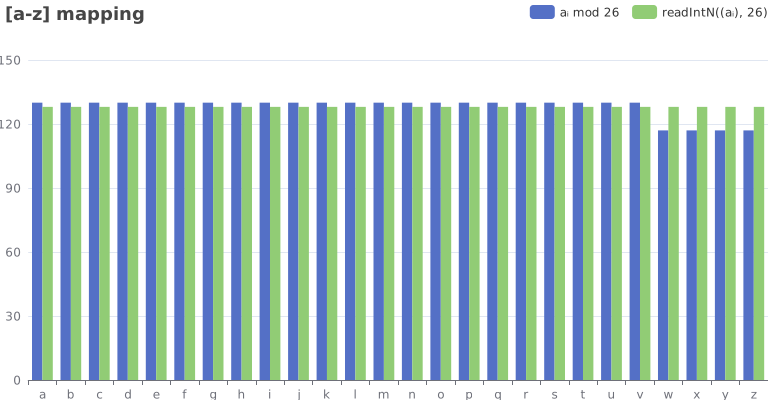
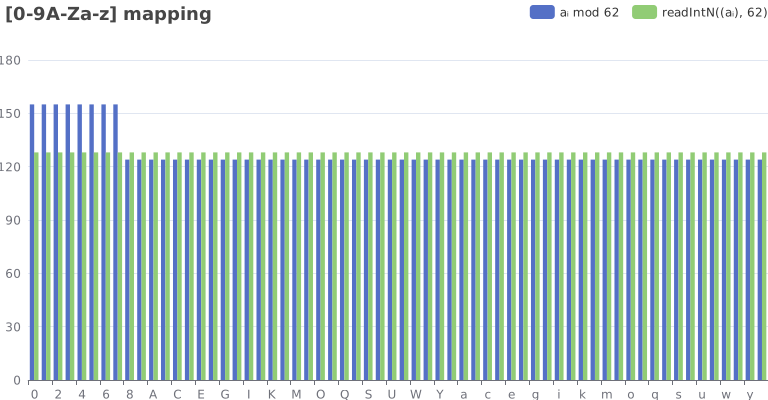
So why does this happen? Well let’s take a look at a graph of :
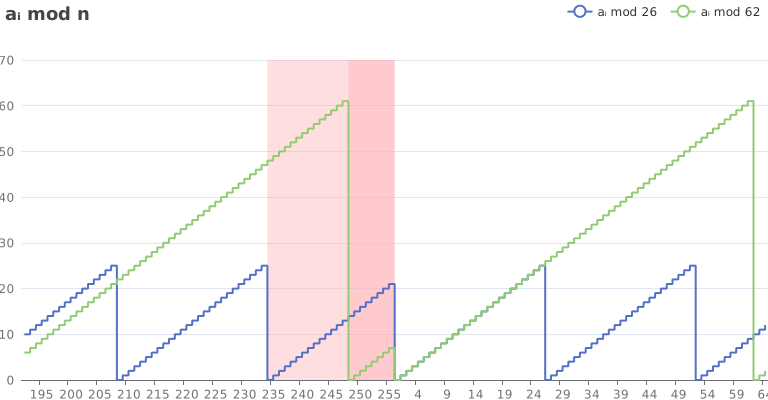
We’ve zoomed into the section around and you can see that the progression of from to doesn’t get to complete before again and the sequence resets. This is why we see certain characters over-represented, they happen to correspond to the lower values that we get in this final section. While the characters we see under-represented are those that happen to correspond to the higher values we miss out on.
There are many different ways to get rid of this bias. One of the simplest way is to always read a value of that is far bigger than and then ignore the bias. This works pretty well, but still has a very small amount of bias and requires reading more bytes from the underlying io.Reader.
The approach we take is a combination of rejection sampling and the modulo operation. If we read a value of that’s in the red zone on the graph above, we reject it and read a new value until we find one outside the biased range. Once we have our value , we calculate just as we initially would have. By rejecting values in the biased range, we ensure that our calculated value won’t exhibit any bias. With a few additional optimisations, we end up with something similar to:
func readIntN(r io.ByteReader, n byte) byte {
	if n == 1 {
		return 0
	}

	a, _ := r.ReadByte()
	if n&(n-1) == 0 { // n is power of two, can mask
		return a & (n - 1)
	}

	// If n does not divide a, to avoid bias we must not use a a that is within
	// math.MaxUint8%n of the top of the range.
	if a > math.MaxUint8-n { // Fast check.
		ceiling := math.MaxUint8 - math.MaxUint8%n
		for a >= ceiling {
			a, _ = r.ReadByte()
		}
	}

	return a % n
}
Sources of randomness
One unique feature of go.tmthrgd.dev/passit is that all generators (unless otherwise noted) are deterministic. You might be wondering what that means. In short it means that for the same io.Reader input stream, the Generator will always generate the same output.
That sounds like a security vulnerability! Are you telling me it will always generate the same password!?
Only when it’s provided exactly the same input.
Ultimately this is a really good thing as it separates the randomness generation from the password encoding step. That allows both to be analysed and understood independently. You can think of this package a bit like a custom Base64 encoder, bytes come in, text comes out, same bytes, same text.
Most callers should be using crypto/rand.Reader which provides a random stream that changes on every read. When using something like this, every password generated will be random and different. crypto/rand.Reader uses the system’s random number generator—which is always the right choice for randomness.
But for some callers, it’s possible to build deterministic password generators using this package. Spectre is an example of this, it uses scrypt and HMAC to produce per-site passwords derived from a master password without using a vault. cloudflare/gokey is another example that uses PBKDF, HKDF and AES-CTR to create passwords and keys derived either from a master password or from a seed file.
Great care must be taken when using deterministic password generation as the generated password is only ever as good as the provided source of randomness.
Examples
So what might it look like to generate a password? Well here are some examples:
package passit_test

import (
	"crypto/rand"
	"fmt"
	"regexp/syntax"

	"go.tmthrgd.dev/passit"
)

func ExampleEFFLargeWordlist() {
	pass, _ := passit.Repeat(passit.EFFLargeWordlist, "-", 4).Password(rand.Reader)
	fmt.Println(pass) // Example output: winner-vertigo-spurs-believed
}

func ExampleLatinMixed() {
	pass, _ := passit.Repeat(passit.LatinMixed, "", 25).Password(rand.Reader)
	fmt.Println(pass) // Example output: YxIShGyLUaRUKYwWTcxDJirMd
}

func ExampleLatinLowerDigit() {
	pass, _ := passit.Repeat(passit.LatinLowerDigit, "", 25).Password(rand.Reader)
	fmt.Println(pass) // Example output: 4rd6x4ix2e8rwqhkqk08smzst
}

func ExampleDigit() {
	pass, _ := passit.Repeat(passit.Digit, "", 4).Password(rand.Reader)
	fmt.Println(pass) // Example output: 2352
}

func ExampleParseRegexp() {
	gen, _ := passit.ParseRegexp("[a-z]{7}[0-9]{3}[!@#$%^&*]{2}", syntax.Perl)
	pass, _ := gen.Password(rand.Reader)
	fmt.Println(pass) // Example output: wboonxd576#^
}

func ExampleSpectreMaximum() {
	pass, _ := passit.SpectreMaximum.Password(rand.Reader)
	fmt.Println(pass) // Example output: R2.%r7#UK60qtJ!2wT23
}
Of course you should be checking the error return values—these are just examples after all.
For performance sensitive applications it’s advisable to ensure that the io.Reader also implements io.ByteReader. This can be done by using bufio.NewReader.
License
go.tmthrgd.dev/passit is Copyright © 2022, Tom Thorogood and is licensed under a BSD 3-Clause License. Feel free to use it however you want in accordance with the license.
Fin
Go forth and generate passwords.
Getting to the bottom of an OpenWRT IPv6 problem
It’s been quite a while since I’ve had a working IPv6 connection which is quite unforgivable in 2021. My ISP launched IPv6 support (in beta) back in 2018, but had to suspend the trial several times due to numerous bugs in Cisco’s routers.
Ultimately I ended up forgetting about IPv6 entirely during one of these periods and accepted that I was relegated to a world of legacy IPv4 addresses. That is until today when I decided to finally get IPv6 working again. It looked like my ISP had their IPv6 support back in full swing so it should have been easy.
The thing is though, I shouldn’t actually have had to do anything. I have a pretty simple setup, an old TP-Link wireless router flashed with OpenWRT is all that sits between me and the NBN NTD. OpenWRT was close to up-to-date and had an IPv6 WAN interface all ready to go, but for some reason it just wasn’t working.
I tried updating from 19.07.2 to the latest 19.07.5, but that made no difference.
Taking a look through the router’s system log showed a number of entries like this:
Tue Jan  5 02:50:00 2021 daemon.notice netifd: Interface 'wan6' has link connectivity
Tue Jan  5 02:50:00 2021 daemon.notice netifd: Interface 'wan6' is setting up now
Tue Jan  5 02:50:01 2021 daemon.err odhcp6c[5860]: Failed to send RS (Permission denied)
Tue Jan  5 02:50:02 2021 daemon.err odhcp6c[5860]: Failed to send DHCPV6 message to ff02::1:2 (Permission denied)
Tue Jan  5 02:50:03 2021 daemon.err odhcp6c[5860]: Failed to send DHCPV6 message to ff02::1:2 (Permission denied)
Tue Jan  5 02:50:05 2021 daemon.err odhcp6c[5860]: Failed to send RS (Permission denied)
Tue Jan  5 02:50:05 2021 daemon.err odhcp6c[5860]: Failed to send DHCPV6 message to ff02::1:2 (Permission denied)
Tue Jan  5 02:50:09 2021 daemon.err odhcp6c[5860]: Failed to send RS (Permission denied)
Tue Jan  5 02:50:09 2021 daemon.err odhcp6c[5860]: Failed to send DHCPV6 message to ff02::1:2 (Permission denied)
Tue Jan  5 02:50:13 2021 daemon.err odhcp6c[5860]: Failed to send RS (Permission denied)
Tue Jan  5 02:50:17 2021 daemon.err odhcp6c[5860]: Failed to send DHCPV6 message to ff02::1:2 (Permission denied)
Tue Jan  5 02:50:35 2021 daemon.err odhcp6c[5860]: Failed to send DHCPV6 message to ff02::1:2 (Permission denied)
An hour or more of Googling various words and phrases from those messages came up with nothing. Not one solution seemed to help. Nobody else who suffered from “Permission denied” errors or “Failed to send” errors seemed to have the same problem as I did.
After a bit of poking around in an ssh session[1] I noticed something quite unusual: the eth0.2 interface, a VLAN interface used by wan and wan6, didn’t have an IPv6 link-local address. Without that there was no way for the router to establish an DHCPv6 connection to the NBN NTD. Interestingly enough the eth0 interface did have a IPv6 link-local address.
root@OpenWrt:~# ip addr show eth0
2: eth0: <BROADCAST,MULTICAST,UP,LOWER_UP> mtu 1500 qdisc fq_codel state UP qlen 1000
    link/ether 00:00:5e:00:53:00 brd ff:ff:ff:ff:ff:ff
    inet6 fe80::5eff:fe00:5300/64 scope link
       valid_lft forever preferred_lft forever
root@OpenWrt:~# ip addr show eth0.2
9: eth0.2@eth0: <BROADCAST,MULTICAST,UP,LOWER_UP> mtu 1500 qdisc noqueue state UP qlen 1000
    link/ether 00:00:5e:00:53:00 brd ff:ff:ff:ff:ff:ff
    inet 192.0.2.69/21 brd 192.0.2.1 scope global eth0.2
       valid_lft forever preferred_lft forever
(Potentially sensitive values have been replaced. 192.0.2.69 would be my public IPv4 address).
This seemed really strange. A bit more Googling led me to a blog post suggesting the net.ipv6.conf.*.addr_gen_mode sysctl could be to blame and that changing that setting could provide the missing link-local address I was searching for. I queried the settings associated with the eth0.2 interface and… well… something else jumped out at me.
root@OpenWrt:~# sysctl net.ipv6.conf.eth0.2
net.ipv6.conf.eth0.2.accept_dad = 1
net.ipv6.conf.eth0.2.accept_ra = 0
net.ipv6.conf.eth0.2.accept_ra_defrtr = 1
net.ipv6.conf.eth0.2.accept_ra_from_local = 0
net.ipv6.conf.eth0.2.accept_ra_min_hop_limit = 1
net.ipv6.conf.eth0.2.accept_ra_mtu = 1
net.ipv6.conf.eth0.2.accept_ra_pinfo = 1
net.ipv6.conf.eth0.2.accept_redirects = 1
net.ipv6.conf.eth0.2.accept_source_route = 0
net.ipv6.conf.eth0.2.addr_gen_mode = 0
net.ipv6.conf.eth0.2.autoconf = 1
net.ipv6.conf.eth0.2.dad_transmits = 1
net.ipv6.conf.eth0.2.disable_ipv6 = 1
net.ipv6.conf.eth0.2.disable_policy = 0
net.ipv6.conf.eth0.2.drop_unicast_in_l2_multicast = 0
net.ipv6.conf.eth0.2.drop_unsolicited_na = 0
net.ipv6.conf.eth0.2.enhanced_dad = 1
net.ipv6.conf.eth0.2.force_mld_version = 0
net.ipv6.conf.eth0.2.force_tllao = 0
net.ipv6.conf.eth0.2.forwarding = 1
net.ipv6.conf.eth0.2.hop_limit = 64
net.ipv6.conf.eth0.2.ignore_routes_with_linkdown = 0
net.ipv6.conf.eth0.2.keep_addr_on_down = 0
net.ipv6.conf.eth0.2.max_addresses = 16
net.ipv6.conf.eth0.2.max_desync_factor = 600
net.ipv6.conf.eth0.2.mc_forwarding = 0
net.ipv6.conf.eth0.2.mldv1_unsolicited_report_interval = 10000
net.ipv6.conf.eth0.2.mldv2_unsolicited_report_interval = 1000
net.ipv6.conf.eth0.2.mtu = 1500
net.ipv6.conf.eth0.2.ndisc_notify = 0
net.ipv6.conf.eth0.2.proxy_ndp = 0
net.ipv6.conf.eth0.2.regen_max_retry = 3
net.ipv6.conf.eth0.2.router_solicitation_delay = 1
net.ipv6.conf.eth0.2.router_solicitation_interval = 4
net.ipv6.conf.eth0.2.router_solicitation_max_interval = 3600
net.ipv6.conf.eth0.2.router_solicitations = -1
net.ipv6.conf.eth0.2.seg6_enabled = 0
sysctl: error reading key 'net.ipv6.conf.eth0.2.stable_secret': I/O error
net.ipv6.conf.eth0.2.suppress_frag_ndisc = 1
net.ipv6.conf.eth0.2.temp_prefered_lft = 86400
net.ipv6.conf.eth0.2.temp_valid_lft = 604800
net.ipv6.conf.eth0.2.use_oif_addrs_only = 0
net.ipv6.conf.eth0.2.use_tempaddr = 0
Spotted it? This little guy:
net.ipv6.conf.eth0.2.disable_ipv6 = 1
The network interface that I had been trying to establish an IPv6 connection with for months on end, had IPv6 entirely disabled. Could it really be that easy? It turns out yes. It was exactly that easy.
A simple command to re-enable IPv6:
root@OpenWrt:~# sysctl -w net.ipv6.conf.eth0.2.disable_ipv6=0
…and restart the wan6 interface.
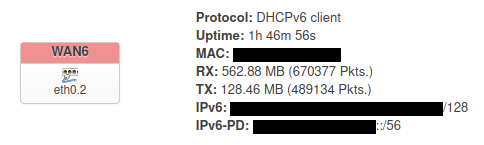
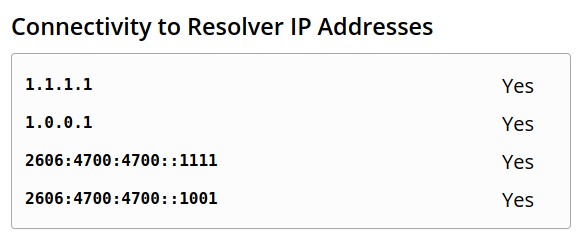
Voila! A working IPv6 internet connection.
The only thing left to do was to add the setting to /etc/sysctl.conf[2] so it would persist across reboots. (I think this step was necessary anyway).
I really have no idea what changed since I last had IPv6 working, perhaps an OpenWRT update broke things. I’m not the first person to stumble upon this strange default setting though, someone posted about it on the OpenWRT forum back in August of 2020. (fantom-x I hope you figured it out too).
It seems like the OpenWRT kernel might be automatically disabling IPv6 support on any VLAN-ed interface. Who knows why. Perhaps my configuration isn’t quite standard, though I don’t see how.
In the end I now have a working IPv6 internet connection and it only took until 2021. This year’s already improving.
After applying the workaround in this issue to connect to the rather out-of-date ssh daemon. ↩︎
I installed nano to do this because I will never understand vim. ↩︎